Avast antivirus explained: what it protects, what it does not, and what to check before you pay
How this page is paid for
This article contains partner links. If you follow one and buy something, the publisher — Abdon Company s.r.o. — receives a commission from the advertiser. You pay the same price either way, and we receive nothing if you simply read the page.
We are not Avast and we do not speak for Avast. This is an independent article written by a named editor. It is not a customer testimonial, it contains no reader submissions, no star ratings and no invented quotations. Where anything here differs from what the vendor publishes, the vendor’s own current information prevails. Our editorial policy explains what we will and will not do for an advertiser.
Avast is one of the best-known names in consumer antivirus software, and it is also one of the most argued-about. This article sets out what the software category actually does, what has changed about the company in the last few years, and the questions worth answering before you spend money — on Avast or on anything else.
Short version. Avast’s free tier does the job that most home users need done, and on a current version of Windows, macOS, Android or iOS the operating system already includes protection of its own. A paid suite buys you extra components — a firewall, ransomware shielding, a VPN, cleanup tools — not fundamentally better virus detection. The company’s handling of user data was the subject of enforcement action by two regulators in 2024, which is worth knowing before you install anything, and worth checking in the product’s privacy settings afterwards.
Contents
- What Avast is, and who owns it now
- How antivirus detection actually works
- What a security suite cannot do for you
- Real-time protection and the scheduled scan
- Free tier against paid suite
- “It won’t slow your computer down”
- The privacy record, and why it matters here
- The built-in option, and the alternatives
- Eight things to check before you pay
- Corrections to the earlier version of this page
- Sources
1. What Avast is, and who owns it now
Avast began in Prague. Pavel Baudiš and Eduard Kučera, who had met at the Research Institute for Mathematical Machines in what was then Czechoslovakia, started writing an antivirus program in the late 1980s and set it up under a cooperative called Alwil. Published accounts date the founding to 1988 or to November 1989 depending on which event they count, so treat “founded in the late 1980s” as the safe formulation. The company later took the name of its product, and in 2001 it began offering the antivirus free to home users — the decision that turned a Czech company into a global one.
Two later events matter more for anyone buying the software today. In July 2016 Avast acquired its Dutch-Czech rival AVG Technologies, so AVG and Avast products have shared an engine ever since. And on 12 September 2022 NortonLifeLock completed its merger with Avast; the combined company renamed itself Gen Digital Inc. and is now dual-headquartered in Tempe, Arizona and in Prague. Norton, Avast, AVG and Avira are today sibling brands inside the same group.
That is worth knowing for a practical reason: comparing “Avast against AVG” or “Avast against Norton” is now, to a significant extent, comparing packaging and pricing rather than comparing independent detection engines.
Advertisement · partner link
See Avast’s current tiers and prices
Prices, tier names and feature tables change frequently and vary by country. The vendor’s own site is the only reliable place to read the current offer.
Visit the Avast websitePartner link · opens in a new tabWe are paid a commission if you buy after following this link. It costs you nothing extra and does not change the price you are offered.
2. How antivirus detection actually works
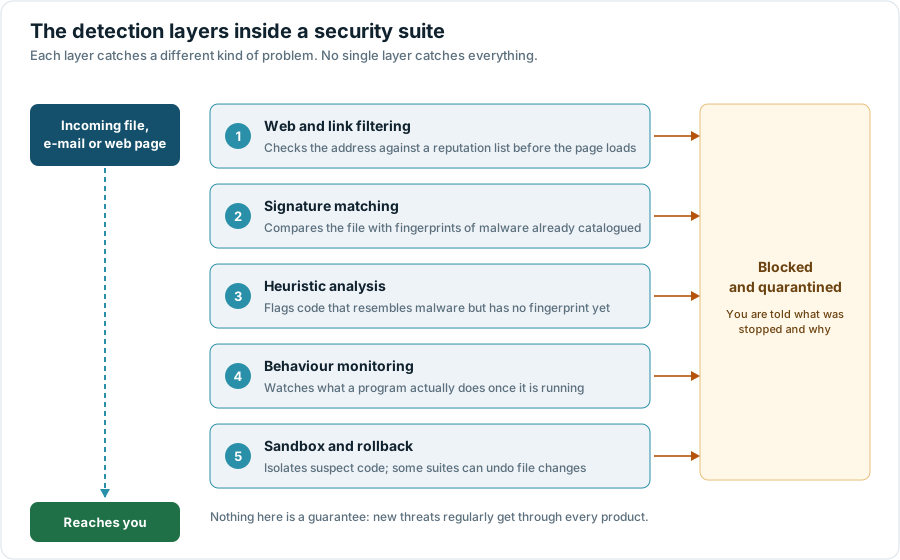
Almost every consumer security product on the market, Avast included, is a stack of the five checks shown in Figure 1. Understanding the stack is the fastest way to see through marketing copy, because each layer has a well-known weakness.
Signature matching compares a file against fingerprints of malware that has already been catalogued. It is fast, cheap and almost never produces a false alarm — and it is useless against something released an hour ago. This is the layer that needs those frequent definition updates.
Heuristic analysis looks for suspicious structure: code that unpacks itself in memory, a document that spawns a script interpreter, an installer that writes to a system directory it has no business touching. It catches novel threats, at the cost of occasionally flagging legitimate software. Every false-positive complaint you have ever read about antivirus software comes from this layer or the next one.
Behaviour monitoring gives up on deciding in advance and watches what a program does once it is running: is it enumerating your documents and encrypting them one by one? This is the layer that catches ransomware families nobody has seen before, and it is the main reason a modern suite is not simply a faster version of a 2005 virus scanner.
Web and link filtering works before any file exists, by checking a domain or URL against a reputation database. Sandboxing and rollback sit at the other end: run the suspect thing in an isolated copy of the system, and keep enough of a journal to undo file changes if the verdict turns out to be wrong.
What this means in practice. No product catches everything, and the published test rounds make that explicit — the good results are in the high nineties of a percent, not at a hundred. Anyone advertising guaranteed protection is describing something that does not exist.
3. What a security suite cannot do for you
The most common disappointment with security software is not that it failed to catch a virus. It is that the problem was never a virus in the first place.
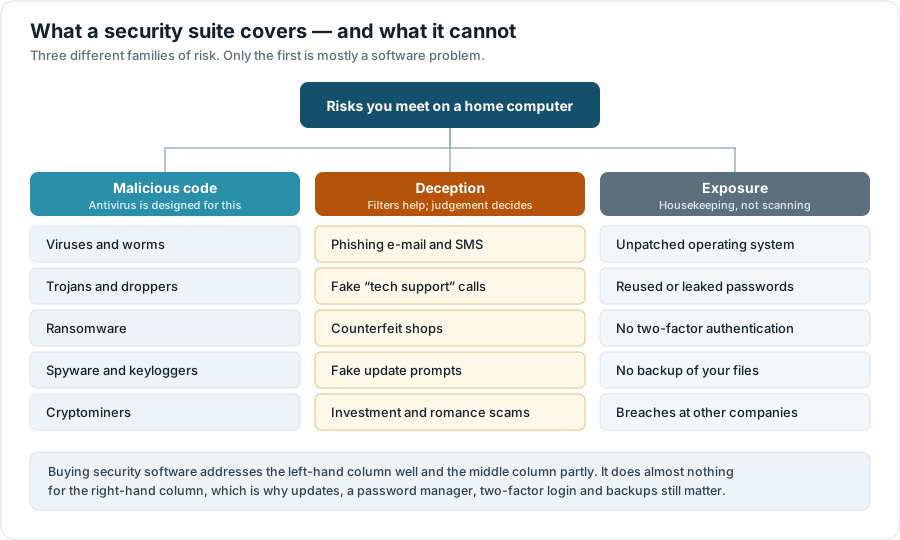
If somebody telephones claiming to be from your bank and talks you into approving a transfer, no scanner was involved. If your password from an unrelated website leaked in a breach four years ago and you reused it, no scanner was involved. If a critical operating-system update has been pending for three months, a scanner is a poor substitute for installing it.
This matters commercially, because security suites are increasingly marketed on the middle and right-hand columns — identity monitoring, scam detection, VPNs, breach alerts. Those can be useful. They are also the components where it is hardest to judge whether you are getting value, and easiest for an advertisement to imply more than the product delivers.
4. Real-time protection and the scheduled scan
Two mechanisms inside the same product do quite different jobs, and the difference explains a lot of confused advice.
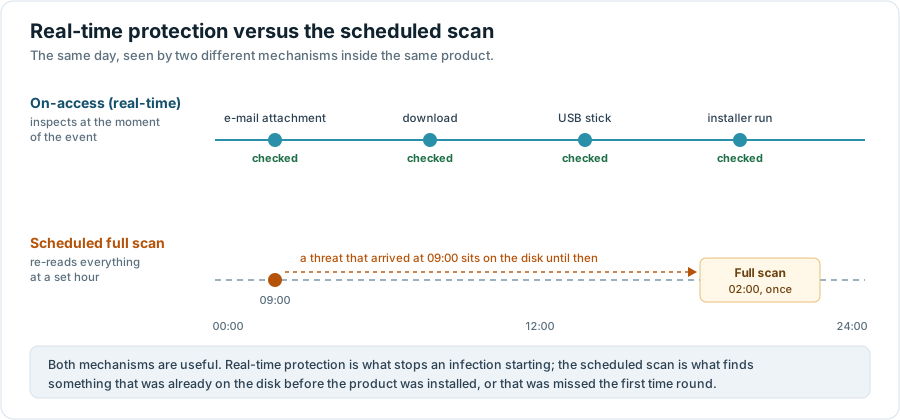
On-access, or real-time, protection hooks into the operating system and inspects files at the moment they are written, opened or executed. This is the part that actually prevents infections, and it is the part that costs continuous resources.
The scheduled full scan re-reads everything on the disk at a set time. Its value is retrospective: it finds threats that were on the machine before the product was installed, or that were not recognised when they first arrived but are now in the definition database. Running one weekly is sensible. Running one nightly on a large drive mostly costs you electricity.
If a product feels slow, the setting worth changing is the scan schedule, not the real-time protection.
5. Free tier against paid suite
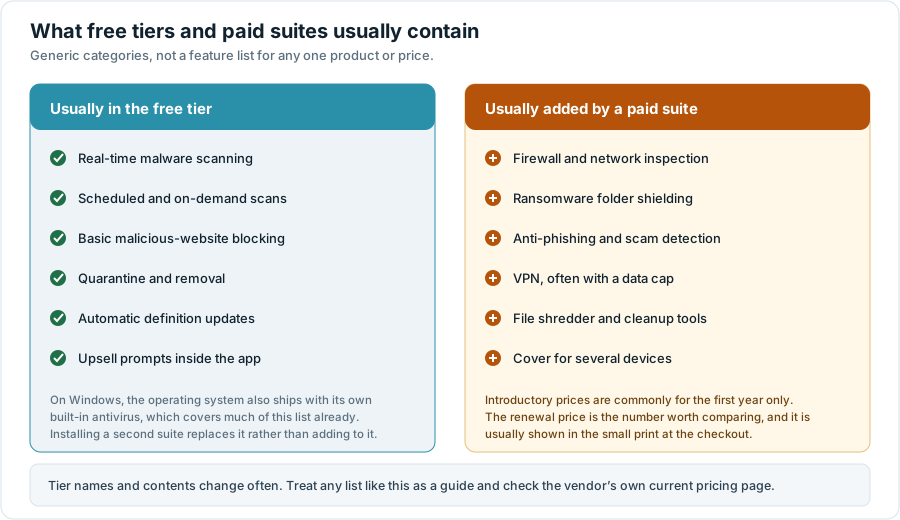
Avast currently offers a free antivirus alongside paid products, which it packages under the Avast One name together with Avast Premium Security, Avast SecureLine VPN and Avast Cleanup Premium; the company introduced a rebuilt, more modular version of Avast One in 2026. Because tier names and contents move around, the honest way to describe the difference is by category rather than by feature list.
| Question | Where the answer lives |
|---|---|
| How well does it detect malware, this quarter? | The current public test round at AV-TEST or AV-Comparatives, both of which publish methodology alongside results. |
| What exactly is in the tier I am about to buy? | The vendor’s own comparison table, in your own country’s store, on the day you buy. |
| What will it cost me in year two? | The renewal terms shown at checkout, not the headline price. |
| What data does it send, and can I switch that off? | The product’s own privacy settings after installation, plus the vendor’s privacy policy. |
| Can I get my money back? | The refund window in the vendor’s terms, plus your statutory withdrawal rights if you bought as a consumer in the EU. |
| Do I already have this? | Your operating system’s own security settings. |
A claim we removed. An earlier version of this page said that the premium version “adds extra features like a VPN, password manager, and file shredder”. A VPN and a file shredder are reasonable descriptions of what paid tiers have included; a password manager is not a dependable part of that description, because Avast retired its standalone password-manager product and its current consumer line-up is not presented that way. We have replaced the specific feature list with the category comparison above.
Advertisement · partner link
Compare the tiers on Avast’s own site
The comparison table on the vendor’s website is the authoritative one, and it shows the price and the renewal terms for your country.
Open the Avast comparison pagePartner link · opens in a new tabWe are paid a commission if you buy after following this link. It costs you nothing extra and does not change the price you are offered.
6. “It won’t slow your computer down”
Every vendor makes some version of this claim, and it is not measurable from a single person’s impression. Whether a suite feels heavy depends on your processor, your disk, how much memory you have, what else is running and what you do all day. Somebody editing raw photos on a five-year-old laptop and somebody reading e-mail on a new one will genuinely disagree, and both will be right about their own machine.
This is why the independent laboratories run a separate performance category. AV-Comparatives publishes a periodic performance test, and AV-TEST scores products for performance alongside protection and usability, using a fixed set of operations — copying files, installing applications, launching programs, browsing — on identical reference hardware. Those results are comparable between products. An anecdote is not.
A claim we removed. The earlier version of this page said that the author had assumed security software would slow the computer down and that “Avast proved me wrong”. That was a personal impression presented as evidence. It has been replaced with a pointer to the laboratories that measure this properly.
7. The privacy record, and why it matters here
This is the part of the Avast story that an advertisement will not tell you, and leaving it out would make this page misleading. It concerns a subsidiary called Jumpshot.
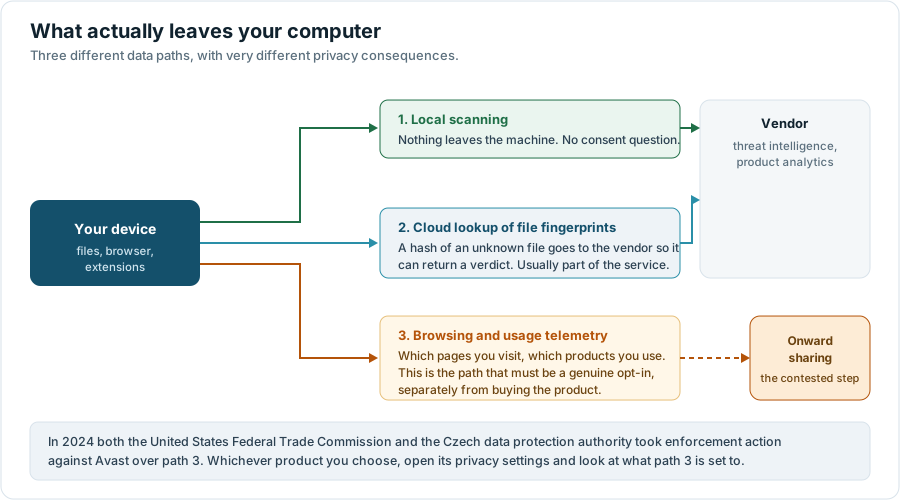
On 22 February 2024 the United States Federal Trade Commission announced an order requiring Avast to pay $16.5 million and banning it from selling or licensing web browsing data for advertising purposes. The FTC’s complaint was that Avast collected consumers’ browsing information through its browser extensions and antivirus software, stored it indefinitely, and sold it — through Jumpshot, from 2014 to 2020, to more than a hundred third parties — while telling those consumers that its products would protect them from online tracking. The order was finalised in June 2024, and in February 2025 the FTC opened a refund claims process for affected customers.
On 15 April 2024 the Czech data protection authority (Úřad pro ochranu osobních údajů, ÚOOÚ) imposed a fine of CZK 351 million on Avast Software s.r.o. for unauthorised processing of personal data of users of its antivirus program and browser extensions. The authority found that data relating to roughly 100 million users had been transferred to Jumpshot Inc. during the period it examined in 2019, that users had been told the data was anonymous trend analytics, and that the data was not in fact anonymised, because at least some individuals could be re-identified from it. The decision is final and binding.
Both matters concern conduct that ended in 2020, and both have now been through the regulatory process, with an order that prohibits the specific practice and requires a privacy programme. We are not suggesting the practice is ongoing, and we have no evidence that it is. But it is directly relevant context for a product whose entire value proposition is trust, and it is the reason we would give the same advice about any security product: after installing it, open its privacy settings and read every data-sharing toggle before you do anything else.
Why we are telling you this on an advertising-funded page. Because our editorial policy says that a commercial relationship does not buy the omission of material facts. If you find this section decisive and choose a different product, that is a legitimate outcome of reading the page.
8. The built-in option, and the alternatives
Before comparing paid products, it is worth being clear about the baseline. Current versions of Windows ship with Microsoft Defender Antivirus enabled by default; macOS includes XProtect and Gatekeeper; Android includes Google Play Protect; iOS restricts what software can do in the first place. None of these are marketed at you, which is why people forget they are there. All of them appear in, or are used as a baseline by, the independent laboratories’ test rounds.
Installing a third-party suite generally replaces the built-in scanner rather than adding to it — two real-time scanners on one machine is a recipe for conflicts, and modern Windows handles the handover automatically. So the question is not “protection or no protection”, it is “is this suite better than what I already have, and is the difference worth the renewal price?”
The honest answer varies by year and by test round, which is exactly why we point you at the laboratories rather than pretending to have run the tests ourselves. What can be said generally: paid suites tend to justify themselves on the extra components — firewall control, ransomware shielding of specific folders, multi-device licences, support you can telephone — rather than on a decisive advantage in raw malware detection.
9. Eight things to check before you pay
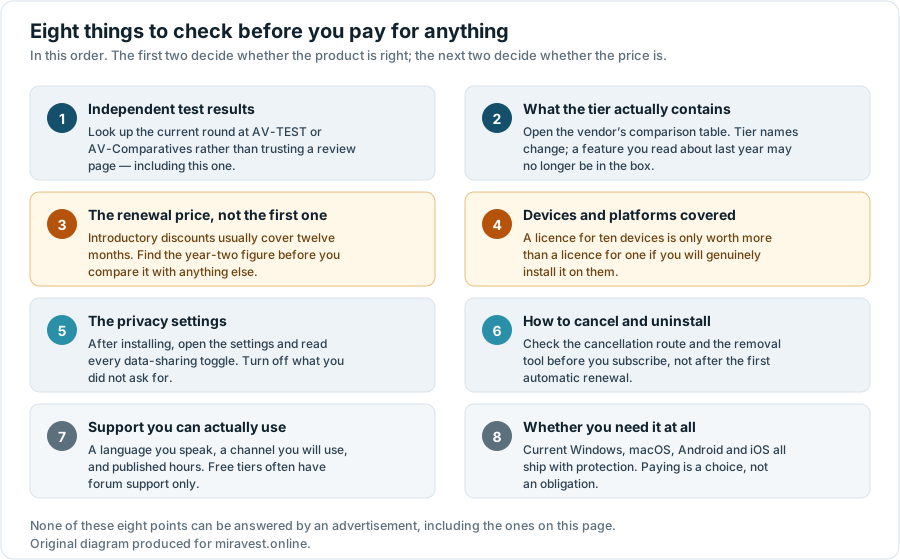
- Independent test results. Look up the current round rather than trusting a review page — including this one.
- What the tier actually contains. Read the vendor’s comparison table on the day you buy, in your own country’s store.
- The renewal price. Introductory discounts typically cover the first year only. Compare year-two prices.
- Devices and platforms. A ten-device licence is only better value if you will install it on ten devices.
- The privacy settings. Open them immediately after installing and turn off the data sharing you did not ask for.
- Cancellation and uninstallation. Find the route out before you subscribe, and check whether the subscription auto-renews.
- Support. In a language you speak, on a channel you will use. Free tiers often have community support only.
- Whether you need it at all. Your operating system already includes protection. Paying for more is a choice, not an obligation.
On the illustrations. Every diagram on this page was drawn specifically for this article as an original SVG file and is served from this domain. There are no product screenshots, no stock photography and no vendor marketing images anywhere on this site.
Advertisement · partner link
Ready to look at the offer yourself?
If, after all of the above, Avast looks like the right fit, the vendor’s own page is where the current price, the tier contents and the refund terms are stated.
Go to the Avast websitePartner link · opens in a new tabWe are paid a commission if you buy after following this link. It costs you nothing extra and does not change the price you are offered.
10. Corrections to the earlier version of this page
This page previously carried a different article. It has been rewritten because parts of it did not meet the standard set out in our editorial policy. In the interest of being straightforward about it, here is what changed.
- The page was presented as “a reader’s honest review” and a “reader-submitted story”. It was not. No reader submitted it, and there was no reader. The article now carries the name of the editor who is responsible for it.
- The headline claim that Avast “outperforms other security tools” was removed. It was not supported by any cited test and we are not in a position to make it.
- A first-person account of the software not slowing the author’s computer down was removed, and replaced with an explanation of how performance is actually measured.
- The description of paid features was corrected, as set out in section 5.
- The company history was vague (“around for decades”, “used by millions”) and omitted the 2022 merger into Gen Digital. Dated, sourced facts replace it.
- The 2024 enforcement actions by the FTC and by the Czech data protection authority were not mentioned at all. They now have their own section.
- An invitation to “leave a comment below” was removed: there is no comment function on this site, and adding one would mean collecting personal data.
- The site previously carried a cookie banner and policies describing analytics and advertising cookies. The site does not set any. The banner and the machinery behind it have been removed, and the policies now describe what actually happens.
If you find a factual error anywhere on this site, write to info@miravest.online. Our corrections procedure is published, and corrections are recorded on the page they affect rather than made silently.
11. Sources
- Federal Trade Commission, “FTC Order Will Ban Avast from Selling Browsing Data for Advertising Purposes, Require It to Pay $16.5 Million”, 22 February 2024. ftc.gov
- Federal Trade Commission, “FTC Finalizes Order with Avast”, June 2024. ftc.gov
- Federal Trade Commission, “FTC Announces Refund Claims Process for Avast Customers”, February 2025. ftc.gov
- Úřad pro ochranu osobních údajů (Czech DPA), “Czech DPA imposed fine of 351 million CZK for GDPR infringement”, April 2024. uoou.gov.cz
- Gen Digital, “NortonLifeLock Completes Merger with Avast”, 12 September 2022. newsroom.gendigital.com
- Avast, product and tier comparison. avast.com/compare-antivirus and avast.com/avast-one
- AV-TEST Institute, independent tests of antivirus software. av-test.org
- AV-Comparatives, independent tests including the periodic performance test. av-comparatives.org
Where this article and the vendor disagree, the vendor’s own current information prevails. Prices, tier contents and feature names change without notice and differ between countries; nothing on this page is an offer, a price quotation, or advice tailored to your situation.
Avast, Avast One and related names and logos are trademarks of their respective owners. miravest.online is an independent publication operated by Abdon Company s.r.o. and is not affiliated with, endorsed by, sponsored by, or officially connected to Avast, Gen Digital Inc. or any of their subsidiaries.